Mrs. T's Art Room
  • Mrs. T's Blog
  • Arts Integration
    • HOT Blocks
    • HOT Block Resources
    • Arts Integration Resources
  • Get Connected
    • Art Teacher Resources
    • Ed Tech Resources
    • Twitter for Educators

Twitter 101 Workshop, May 28, 2014

5/27/2014

0 Comments

 
Here are the links for today's Twitter 101. Yes, I got them all from educators on Twitter!


Twitter 101 Smore flyer by Sherry Gick @LibraryFanatic 


Twitter Tutorial for Beginners, by @julnilsmith. Thanks, Julie! I couldn't have said it better myself!


The Twitteraholic’s Ultimate Guide to tweets, hashtags, and all things Twitter by Sue Waters.
This page has a huge list of links to everything you'd like to know about using Twitter.

Cybraryman's Educational hashtag page by Jerry Blumengarten @cybraryman1 
Go to this page to find hashtags that you are interested in.

Don't know who to follow on Twitter? Here is Jerry Blumengaarten's PLN Star Page
Go to the person's Twitter page, read some of their Tweets. If they look interesting to you, then follow !

0 Comments

Intro to Twitter for Teachers

5/23/2014

0 Comments

 
Here are the links I presented at a faculty meeting. It lasted only 10 minutes.
Here is the Prezi if you would like to see it or use it!

Create your own backchannel at:
https://todaysmeet.com/
 
Cybraryman’s webpage with many educational hashtags.
Find the ones that interest you!
http://www.cybraryman.com/edhashtags.html
 
Twitter search:
https://twitter.com/search-home
Use # to search for a topic, @ to search a person.
 
I didn't have time to talk about this link at the meeting, but if you want to know who to follow, here ya go!
People to follow on Twitter: Building a PLN (Professional Learning Network)
http://cybraryman.com/plnstars.html 

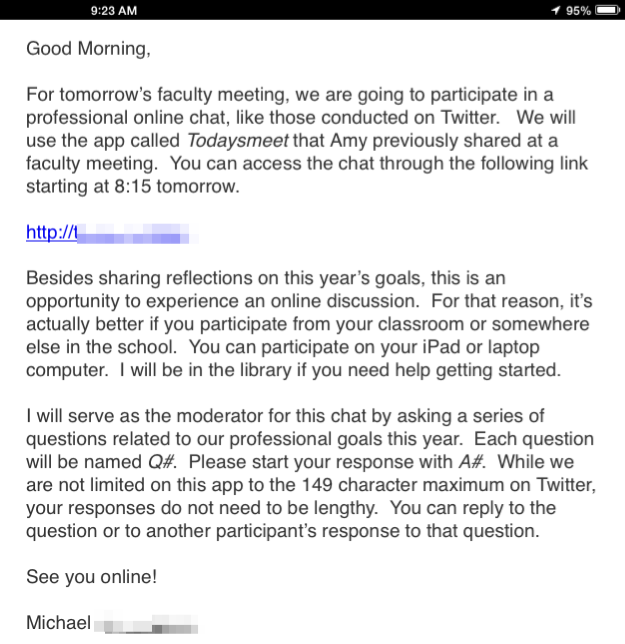
A few weeks later, my assistant principal had a fabulous idea for the faculty meeting. 
His e-mail is below.

Picture
How awesome is THAT? And I had to drive to a meeting during that time! So I pulled over, got a Starbucks, and participated for a few minutes. True story!
0 Comments

Free Professional Development for Educators:       Build a Professional Learning Network           (PLN) on Twitter

5/22/2014

0 Comments

 
Picture
See this article in the 2014 Summer HOT Schools Newsletter, Issue 5

All right, I admit it. I am a Twitter-holic. As I check my Twitter feed these days, I’ve been thinking and reflecting: How did I get to this point in my professional growth using Twitter for PD? How could I learn so much on-line?

October 2011:  I attended an educational technology conference, went to a “Twitter for PD” session, the presenter talked about PD a little. She spent most of the time telling us about how she had her students Tweet in class on iPod touches. I don’t get it.

The very next day, October 2011:  I created a Twitter account and send my first Tweet to a friend. Played around with it a bit. Really did not understand how this was going to work for me. Followed my 21-year-old son and a few museums, a few people I knew. Twitter was not very exciting at this point.

All of 2012:  I had a discussion with my son- so what is with this Twitter thing? I still don’t get it!!! He told me I could get local or world news more quickly on Twitter. Hmmm. I followed some local news stations. I used Twitter for news updates quite successfully through a few severe storms, which produced severe power outages we endured for many days, up to a week! Ok, I thought, maybe Twitter can be useful.

Early 2013:  I really did not use or check Twitter at all. I thought it was probably a waste of my time.

March 2013. I was lucky enough to be one of fourteen teachers in my school to be given an iPad 2.  And that is when I remembered something from that “Twitter for PD” session way back in 2011. Didn’t that presenter say that I could learn from others on Twitter? It was time to get online and figure out how I could actually do it.

Getting my own iPad also prompted me to start using the shared student iPad cart. My students used Wixie, an online, cloud based program to draw and save their drawings. We had to use this program because there was no other way to get student work off of the shared iPads. We were sharing devices that were not meant to be shared, and e-mail was disabled. I needed to research ways to remove student work easily. Why have students create something if they can’t get it off of the device?

Summer 2013: I looked for educational technology experts online and followed them on Twitter. I learned that effective technology integration is achieved when it supports curricular goals. I discovered how to create innovative lessons, increase student engagement, and mirror my iPad for demonstrations.  This research work was like taking a technology integration class, for free, at my own pace.

Fall 2013-Now: After discovering how much I could learn on Twitter, I knew I needed to find more people to follow. I looked at the educators I was following: whom were they following and interacting with? Which hashtags were they using? I discovered the hashtags that I needed to find other educators with my interests:

#artsint = arts integration

#artsed = arts education

#edtech = educational technology

#HOTSchools = HOT Schools

The key to Twitter is finding the right hashtags to use and follow. Google “educational hashtags” to find the ones that interest you. Then go to Twitter.com/search, put them in the search box and see what comes up! You don’t even have to join Twitter to do this search. Access ideas connected to your professional interests; take ownership of your own learning. Experience differentiation as a learner.

Want to join me? Follow me at @atragg: let’s learn together, have discussions and challenge our thinking. But be careful: you may become addicted to learning on Twitter too!


0 Comments

    Amy Traggianese

    Visual art and arts integration with a techie twist!
     
    I don't like disclaimers, but: none of my ideas expressed in this blog post or website are supported or endorsed in any manner by my employer or anyone else. I just write it as I see it, and that is that.

    Picture
    Picture
    Picture

    This website uses marketing and tracking technologies. Opting out of this will opt you out of all cookies, except for those needed to run the website. Note that some products may not work as well without tracking cookies.

    Opt Out of Cookies
    Picture

    Archives

    July 2018
    June 2018
    May 2018
    April 2018
    March 2018
    February 2018
    January 2018
    November 2017
    August 2017
    April 2017
    November 2016
    September 2016
    March 2016
    January 2016
    October 2015
    August 2015
    July 2015
    June 2015
    April 2015
    March 2015
    February 2015
    January 2015
    November 2014
    October 2014
    September 2014
    August 2014
    June 2014
    May 2014
    January 2014
    December 2013
    November 2013

    Categories

    All
    Art Ed Bloggers Network
    Arts Integration
    Bottle Cap Mural
    Cave Art
    CCSS
    Choice Art Studio (TAB)
    EdCamp
    EdTech
    First Grade
    GAFE
    Henna
    NCAS
    NGSS
    Online Resources
    PLN
    STEAM
    Teaching Art
    Twitter
    Video
    What Is Art?

    Picture
    Picture

    RSS Feed

    This page contains affiliate links from Amazon.
    We earn a small percentage of the sales made through these links at no extra cost to you.
    Thanks for your support.
Powered by Create your own unique website with customizable templates.